 Max ArsenalMaterial in Spanish
You already have your Jarvis. Now talk to it.
Talk to your own agent by voice, in real time: you speak, it answers out loud in under a second, and you can interrupt it like a person.
One-time payment · Instant access · 7-day guarantee · Material in Spanish
For people who already have Jarvis installed. The voice is paid separately to Google: ≈ US$ 0.03 per minute.
Don't have your Jarvis yet? Start here →
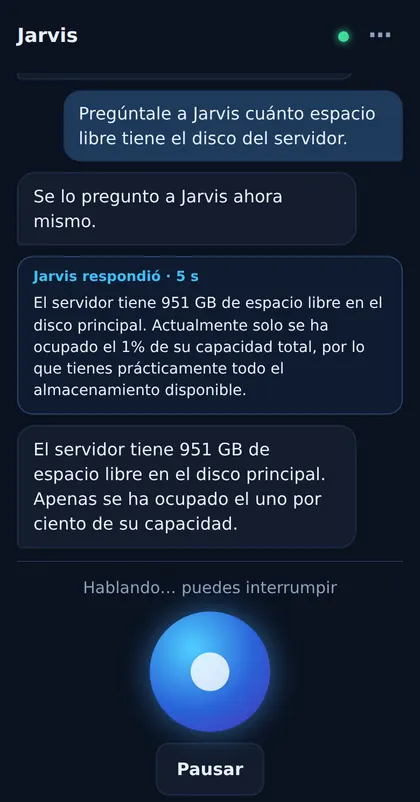
Watch a real conversation
54 seconds recorded in one take, in Spanish, with on-screen subtitles.
- “Hi Jarvis, can you hear me?” → answers out loud in half a second.
- “Ask Jarvis how much free space the server disk has.” → the voice hands the request to your Jarvis, which actually checks the server, and 5 seconds later the voice tells you the result.
- “Tell me the history of radio…” and, halfway through, “Stop, stop. Just tell me the time.” → it goes quiet and answers the new request.
The user's voice in the video is synthesized (we ran the test without a microphone). The answers, timings and screen are real.
One-time payment · Instant access · 7-day guarantee · Material in Spanish
Typing in Telegram is useful. Talking is something else.
Your Jarvis already works for you 24/7. But sometimes typing just doesn't work: driving, cooking, hands busy in the workshop, walking the dog. Sending voice notes back and forth isn't a conversation either.
Real time
Nothing to record or send. Tap a button and talk.
Answers instantly
In our test, 0.3 to 0.7 seconds on most turns.
Interrupt anytime
Talk over it and it goes quiet in under a second.
It's YOUR actual Jarvis
Tasks, data and things to remember go to your agent, with its memory, skills and access to your server. What you save by voice, Jarvis also remembers in Telegram.
Doesn't make things up
The voice hands every real-data question to Jarvis, repeats numbers exactly and tells you when something failed.
Spending brakes on
Daily minute limit, auto-pause when nobody talks and a cost counter on screen.
One-time payment · Instant access · 7-day guarantee · Material in Spanish
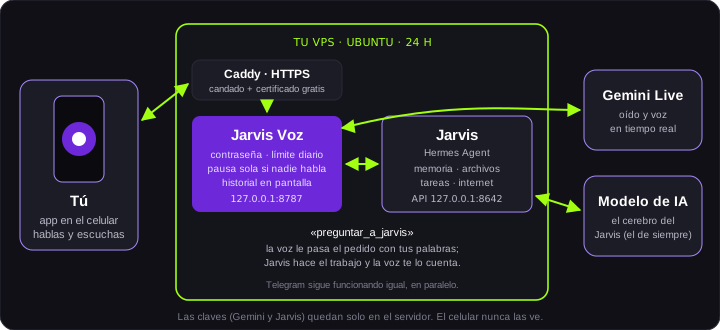
How it works (no magic)
The voice
Google's Gemini Live listens and speaks in real time.
Your Jarvis
Hermes Agent, on your server, does the real work.
All on your server
With your keys and behind your password. The phone never sees your keys.
Tested end to end
- 0.3–0.7 sfrom finishing your sentence to hearing the answer, on most turns
- 5 sfor your Jarvis to check the server disk and the voice to report back
- 12 sto install with the guided installer (plus 1 minute of system packages)
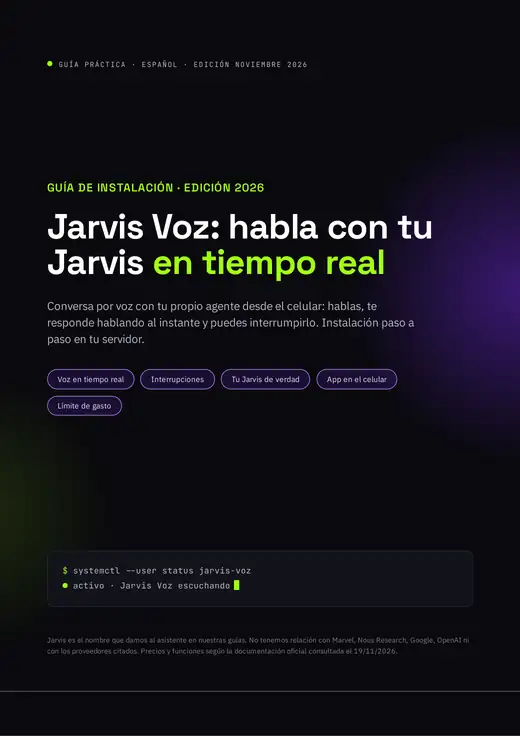
Real pages from the guide (in Spanish). Tap one to see it larger.
1 / 7
One-time payment · Instant access · 7-day guarantee · Material in Spanish
What you get
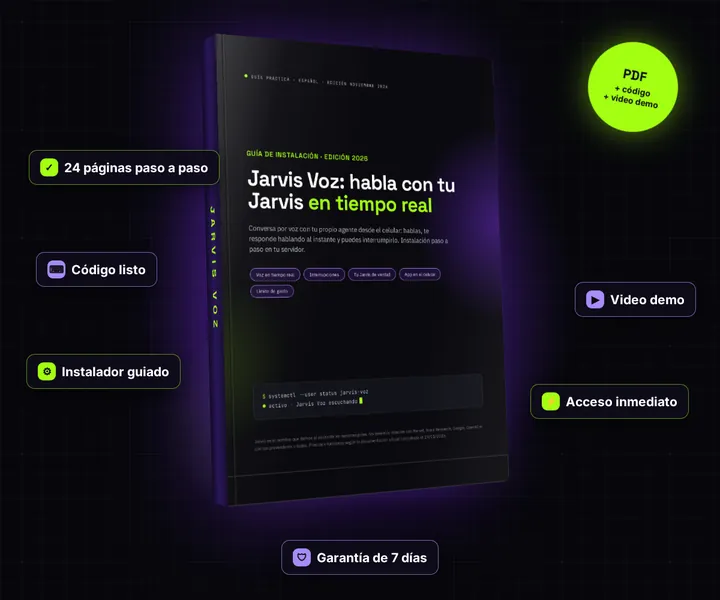
The Jarvis Voz software
Source code for you: server + a phone app you install like an app (Android and iPhone).
Guided installer
One command and 6 questions. In the real test, installation took 12 seconds (plus 1 minute of system packages).
24-page PDF guide (Spanish)
Step by step: voice key, installation, HTTPS with a domain (free option too), phone, first conversation, spending control, security and troubleshooting.
Pack for Claude Code or Codex
If you use one of those assistants, it walks you through the install without pasting your keys into the chat.
Demo video
The real conversation on this page, so you know what it should look like.
US$ 47
One-time payment. No monthly fee from us. Version 1.x updates included.
One-time payment · Instant access · 7-day guarantee · Material in Spanish
What it costs to use (real numbers)
The voice is paid to Google, per use. This is what we measured:
| One minute of active conversation | ≈ US$ 0.03 |
|---|---|
| 10 minutes a day | ≈ US$ 9 per month |
| 3 to 5 minutes a day | ≈ US$ 3 to 5 per month |
| Open mic in silence | ≈ US$ 0.006 per minute, auto-pauses after 90 s |
| Domain for HTTPS | US$ 0 (your own subdomain or DuckDNS) or ≈ US$ 10 per year |
Google has a free tier for testing (our test ran on it), with limits. Your requests to Jarvis use the AI model you already pay for, on the same server.
Google prices checked on 11/19/2026. They may change; the guide shows where to check the current price.
Before you buy, check
- Your Jarvis (Hermes Agent) already answers in Telegram on your server.
- You can log into your server over SSH (as in the Jarvis guide).
- You're OK paying Google per minute for the voice (or using the free tier to test).
- You have or can create a domain or subdomain (the guide shows a free option).
If you don't have Jarvis yet, start with the Jarvis guide. Jarvis Voz is the next step.
See the Jarvis guide →One-time payment · Instant access · 7-day guarantee · Material in Spanish
7-day guarantee
If you install it and it's not for you, request a refund through Kiwify within 7 days and get 100% back. No questions asked.
One-time payment · Instant access · 7-day guarantee · Material in Spanish
Frequently asked questions
Do I need Jarvis installed?
Yes. Jarvis Voz is the voice of your Jarvis (Hermes Agent on your server). Without it, the voice has nobody to hand tasks to. If you don't have it yet, start with the Jarvis guide.
Is the material in English?
No: the guide, software and video are in Spanish. The voice is set to neutral Spanish, but Gemini Live understands dozens of languages and usually answers in the language you speak.
Is it a Telegram call?
No. It's its own app (a web page you install like an app on your phone), on your domain. Telegram keeps working as before.
How fast does it answer?
In conversation, 0.3 to 0.7 seconds on most turns (measured). When you ask Jarvis for a task, it depends on the task: 2 to 9 seconds for simple things in our test.
How much per month?
The product is a one-time payment. The voice is paid to Google per use: ≈ US$ 0.03 per minute of active conversation. 10 minutes a day ≈ US$ 9/month; 3 to 5 minutes a day ≈ US$ 3 to 5. Daily limit and auto-pause included.
Can I use Google's free key?
For testing, yes: our test ran on a free key. It has limits, and on the free tier Google may use the content to improve its products. For daily use we recommend enabling billing with a budget.
Does it work with ChatGPT/OpenAI instead of Google?
Version 1's real-time voice uses Gemini Live. Your Jarvis can keep using whatever model it already uses (ChatGPT, Nous Portal or another).
iPhone and Android?
Yes, in the browser (Safari or Chrome), and it installs to the home screen. It also works on a computer (Chrome or Edge).
Do I need a domain?
You need an HTTPS address, because phones only allow the microphone on secure pages. It can be a subdomain of a domain you already own or a free DuckDNS one.
Is it secure?
Only someone with your password can talk to your Jarvis. Login attempts are limited, keys never leave the server and Jarvis's API isn't exposed to the internet.
Do I need to code?
No. You copy 4 commands, answer 6 questions and set up HTTPS following the guide.
Is there a guarantee?
7 days. If it's not for you, request a refund.
One-time payment · Instant access · 7-day guarantee · Material in Spanish
Who's behind it
Max Arsenal is the brand behind the Jarvis guide and Jarvis Voz. We tested the software end to end on a real server before selling it, wrote every step and put the costs in plain sight so you can decide calmly.
Max Arsenal
Follow us on FacebookYour Jarvis already thinks. Give it a voice.
Ready-made software, guided installer, 24-page guide (in Spanish) and 7 days to try it.
One-time payment · Instant access · 7-day guarantee · Material in Spanish
Jarvis is the name we give the assistant in our guides. We are not affiliated with Marvel, Nous Research, Google or OpenAI. Gemini is a Google trademark. Results from the test run on 11/19/2026; timings and costs may vary with your connection, AI model and usage. Google prices checked on 11/19/2026. Material in Spanish.